E-mail Data to DBC
E-mailing your data to DBC is generally the best and fastest way to get support.
Speaking with a member of the DBC support staff can still leave questions open to interpretation. E-mailing your data helps us see the "big picture" and may identify problems not conveyed on the phone. Not having your data may actually delay help.
- Make sure the current document (window) is the top-level document relevant to your question:
- In DBC Finance -
- For anything related to a multi-purpose issue, it's the Financing (Project Finance document).
- For all other analysis, it's the Refund Case, Monitor document, CalcAgent document or Series.
- In DBC Housing, DBC Student Loan or DBC Multi-Family / Health Care - It's the Indenture or Series.
- In DBC PortOpt - The Workfile is the current document.
- In DBC Debt Manager - The Issuing Authority is the current document.
- In DBC Finance -
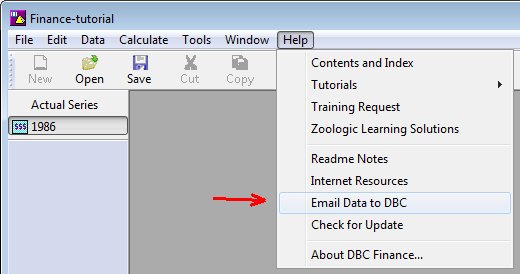
- Go to Help | E-mail Data to DBC.
- In DBC Finance, select Entire Issuer (the default).
- Type your question or comment.
- Hit OK to send your data.
The E-mail Data to DBC function wraps up your data, contact information and System Preferences. It also includes any pertinent external files referenced in your data (e.g an .xls file referenced in Other Formulas in DBC Finance). All of that is e-mailed to us. Support questions are answered in the order they are received. Responses are usually by e-mail. Keep those e-mails for future reference.
It is advised that you enter your contact information in the DBC program (see below) the first time you start the program. Otherwise, you'll be prompted to enter it when using E-mail Data to DBC.
Entering your contact information in the DBC program
Contact information is saved in Preferences and included every time you e-mail your data.
To enter your contact information, go to:
Tools | Preferences | Internet Settings
Or
Tools | System Preferences | Internet Settings
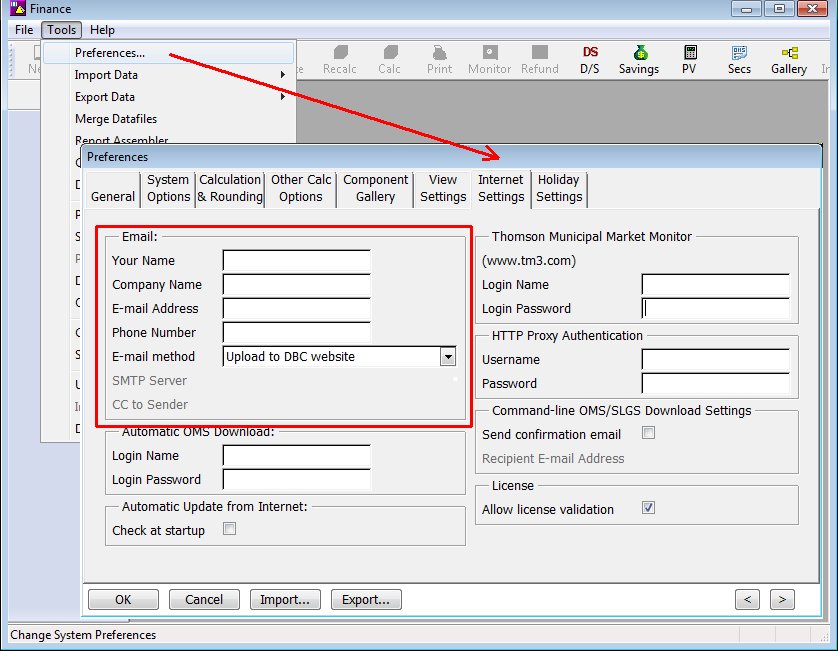
Fill in:
- Your Name
- Company Name
- E-mail Address (double check for typos)
- Phone Number
SMTP Server should be blank unless instructed otherwise by your organization. If the SMTP Server is blank, your data is e-mailed to us through dbcinc.com. Otherwise, your data is e-mailed to us through your e-mail server.
Entering your HTTP proxy information
Unless advised otherwise, you can usually leave the HTTP Proxy Authentication section blank. When sending your data, you may see the Invalid login information message or the Invalid proxy information message. You may have been required to enter a user name and password in your web browser to access the Internet. If so, fill in the Username and Password in Internet Settings.
