DBC Finance samples and tutorial folders are write-protected
In many cases, DBC Finance is installed in the default directory, C:\Program Files\DBC\Finance.
More recent versions of Windows (e.g. Windows 7 or later), will write-protect DBC Finance's samples and tutorial folders. This prevents DBC Finance from opening the data files that are installed with DBC Finance:
- C:\Program Files\DBC\Finance\samples\demo.df2
- C:\Program Files\DBC\Finance\tutorial\tutorial_questions.df2
Even if no changes will be made, DBC Finance requires write privileges to open a datafile. Otherwise, if DBC Finance tries to open one of those data files, the Unable to open message will appear.
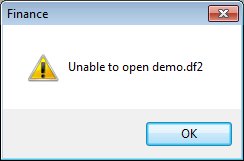
In order for DBC Finance to open those data files, the samples and tutorial folders should be copied to another location such as the Desktop or the Documents folder.
Note: Do not save your live data in samples and tutorial or any data files in those folders. DBC may distribute updated data files which would overwrite your data.