DBCAppServer installation, migration and FAQs
[Show Table of Contents] [Hide Table of Contents (default)]
Overview
DBCAppServer is a client/server method for managing DBC licenses. It is not an "application server". DBC programs are "thick clients".
The main components of DBCAppServer are:
- DBCAppServer program - DBCAppServer program will grant or deny license requests from DBC programs
- network license key - specially programmed USB device with the number of licenses for one or more DBC programs, not a storage device
- USB drivers - installed so the DBCAppServer program can read the network license key.
While the DBC program is running an IP socket is opened to DBCAppServer. The IP socket is closed with the DBC program exits. By default, the IP socket uses TCP/IP port 4046. The DBCAppServer program is small and generates very little network traffic.
Installing DBCAppServer
It does not matter if DBCAppServer is installed before or after the DBC program. But it is possible changes will be made to both configurations.
To install DBCAppServer:
Preparation
- Log in with administrator privileges in order to install the service and USB drivers.
- Unplug any USB license keys.
Download
- Download the USB driver installation program:
for 64 bit versions of Windows...
https://www.dbcinc.com/general/download.php/?arg=download,314504313 for 32 bit versions of Windows...
https://www.dbcinc.com/general/download.php/?arg=download,314504271 - Download the DBCAppServer installer (srvsetup.exe):
https://www.dbcinc.com/general/download.php/?arg=download,525081301 - Download the DBCAppServer installation files (srvsetup.001) to the same folder as srvsetup.exe:
http://www.dbcinc.com/general/download.php/?arg=download,581772878
srvsetup.exe and srvsetup.001 should be saved to the same folder.
Install
- Run the driver installation program (rainbow.exe or rainbow64.exe).
Accept all defaults. Continue the installation to completion. - Run the DBCAppServer installation program (srvsetup.exe).
Accept all defaults. - Plug in the network license key.
That's it.
Depending on the network, DBCAppServer and/or the DBC program may need additional configuration, see Q: What if some users can't run DBC but others can??.
Troubleshooting
Q: What if some users can't run DBC but others can??
Depending on the network, some users may or may not be able run DBC. This may be a configuration issue.
To resolve this issue:
- Direct the DBC program to DBCAppServer
Create a .set file which specifies exactly where to find DBCAppServer. The .set file should be in the same folder where the DBC program is installed.
Use a text editor (e.g. Notepad) to create a .set file with the same name as the DBC program. For example, for DBC Finance (finance.exe), the .set file should be named finance.set. Note, there is no implied .txt extension. The file is finance.set, not finance.set.txt. Add a line in the .set file with the following syntax:
LICENSE_SERVER [ip_address] [tcpip_port]

where:

[ip_address] - the IP address of the PC where DBCAppServer is installed.
    Instead of an IP address, use the TCP host name of the server PC, such as dbc.you.com.
    But access may be slower if the DNS server is congested.
    However this may be preferable if dynamic IP addresses are used.

[tcpip_port] - the TCP/IP port used to communicate with DBCAppServer.  4046 is the default.
For example:
LICENSE_SERVER 192.168.32.111 4046
Note, if DBCAppServer is running on a PC that supports IPv6, see Q: What about support for IPv6??.
- Configure DBCAppServer to accept connections from additional IP addresses
Create or edit the .ips file which specifies the IP addresses that are allowed to connect to DBCAppServer.
For the service version of DBCAppServer (dbcappsv.exe), the .ips file is dbcappsv.ips.
For the Win32 program version of DBCAppServer (blksrvr.exe), the .ips file is blksrvr.ipsBy default, DBCAppServer will only allow connections from certain IP addresses. These IP addresses do not have to be added to the .ips file:
- Any IP address where the first 3 octets match those of DBCAppServer
- 10.0.0.0 - 10.255.255.255 (private IP addresses)
- 172.16.0.0 - 172.31.255.255 (private IP addresses)
- 192.168.0.0 - 192.168.255.255 (private IP addresses)
The .ips file should be in the same folder where DBCAppServer is installed. Use a text editor (e.g. Notepad) to create the .ips file. Note, there is no implied .txt extension. The file is dbcappsv.ips not dbcappsv.ips.txt, blksrvr.ips not blksrvr.ips.txt.
In the .ips file, on separate lines, specify the IP addresses that are allowed to to DBCAppServer. Specify a single IP address or a Class C wildcard. DBCAppServer version 3.48 allowed up to 200 Class C wildcards in the .ips file. DBCAppServer version 3.49 (or later) allows unlimited Class C wildcards in the .ips file.
For example:
142.35.2.20
DBCAppServer will automatically re-load the .ips file. Older DBCAppServer versions had to be stopped/restarted in order to re-load the .ips file; this is no longer the case.
142.123.5.*
Q: How can I tell if DBCAppServer is reading the network license key??
To determine if DBCAppServer is reading the network license key:
- Run DBCAppController (dbcappctrl.exe) which is installed in the same directory as DBCAppServer.
- For IP address, enter the IP address of the PC running DBCAppServer.
- For IP port, enter 4046 (the default TCP/IP port).
- Hit Connect.
- After DBCAppController connects to DBCAppServer, the programming on the network license key should be displayed in the bottom pane.
- If the "block number" is not 0, assume that DBCAppServer is running and it can read the network license key.
- If the "block number" is 0 then the key could not be read. Make sure the USB drivers were installed.
Q: What if I need to change the network license key??
If DBCAppServer ever detects a different network license key, the new key will be rejected, as if there is no key at all. See Q: What happens if I stop DBCAppServer??.
- Stop DBCAppServer. See Q: How do I stop or uninstall DBCAppServer??.
- Remove the old network license key and plug in the new network license key.
- Start DBCAppServer. See Q: How do I stop or uninstall DBCAppServer??. In about 20 seconds users should be able to run DBC program.
Q: What happens if I stop DBCAppServer??
If DBCAppServer is stopped, the currently connected DBC programs will not abort or crash. But users will only be able to save their data and exit the DBC program.
Q:How do I update DBCAppServer??
Updating DBCAppServer will automatically disconnect the users. The DBC programs will not crash but the user will only be able to save and exit. Install the update over the existing DBCAppServer installation (no uninstall is required).
To update the PC running DBCAppServer:
- Download the DBCAppServer installer:
https://www.dbcinc.com/files/general/srvsetup.exe - Download the DBCAppServer installation files to the same folder as srvsetup.exe:
https://www.dbcinc.com/files/general/srvsetup.001 - Run the DBCAppServer installation program (srvsetup.exe).
Accept all defaults.
The setup program will stop the previous DBCAppServer and overwrite it. Then automatically start the updated DBCAppServer.
Wait 20 seconds before trying to start a DBC program.
Q: How do I stop or uninstall DBCAppServer??
If DBCAppServer is stopped when users are connected, they will only be allowed to save their data and exit the DBC program, it will not crash.
Stop the service version of DBCAppServer from Services in the Control Panel. Find the "DBCAppSv" entry.
Or use the service setup utility (svcsetup.exe).
To stop and/or uninstall the service version of DBCAppServer (dbcappsv.exe):
- Run the service setup utility (svcsetup.exe). This program is installed in the same folder as DBCAppServer.
- If the service is running, hit Stop Service. DBCAppServer will not start until the next time the PC is rebooted or hit Start Service to start it.
- Once the service has stopped, hit Uninstall Service to prevent DBCAppServer from running upon rebooting.
- To totally remove DBCAppServer and the supporting utilities, delete the entire directory.
To stop or uninstall the Win32 program version of DBCAppServer (blksrvr.exe):
- Close the blksrvr.exe.
- Delete DBCAppServer from the Windows Startup group. DBCAppServer will not start upon logging in.
- Then, to totally remove DBCAppServer and the supporting utilities, delete the entire directory.
Start DBCAppServer again by clicking DBCAppServer in the Windows Startup group or log off and log on.
Utilities
Q: What is DBCAppController?
DBCAppController (dbcappctrl.exe) is a utility that connects to DBCAppServer. It is found in the same folder as DBCAppServer.
The default location for dbcappctrl.exe is:
C:\Program Files\DBC\AppServer\dbcappctrl.exe
Use DBCAppController to:
- Determine how many users are currently running the DBC programs.
- Determine how many licenses and programs are programmed on the network license key.
- Determine the number of the network license key.
- Determine the version of DBCAppServer.
- Copy the list of users (by IP address and e-mail address, if known) to the Windows Clipboard.
- Disconnect selected users or all users. A disconnected user will only be able to save data and exit their DBC program; the program will not automatically abort.
When starting DBCAppController, enter:
- For IP address, enter the IP address of the PC running DBCAppServer.
- For IP port, enter 4046 (the default TCP/IP port).
- Enter the password to connect to DBCAppServer. The optional password was specified when DBCAppServer was installed.
- Hit Connect.

If the DBCAppController successfully connects to DBCAppServer, the IP address and TCP/IP port will be saved.
Note, DBCAppController connects to DBCAppServer over the network. It is not necessary to run DBCAppController while logged onto the actual PC running DBCAppServer.

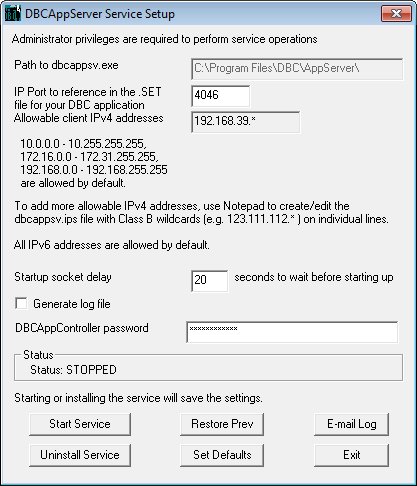
Q: What is svcsetup.exe??
svcsetup.exe is a utility found in the same folder as DBCAppServer. svcsetup.exe can be used to:
- Install/uninstall the service version of DBCAppServer (dbcappsv.exe).
- Start/stop the service version of DBCAppServer (dbcappsv.exe).
- Determine the location of the instance of dbcappsv.exe that is installed as a service.
- Turn on the log file. The log file is a text file that will be saved in the same directory as DBCAppServer.
Miscellaneous
Q: How do I manually terminate a license (connection)??
If a DBC program crashes, the IP socket to DBCAppServer should close automatically and free the license. However it may be desirable to manually terminate license.
Perform the following steps to terminate a license:
- Run dbcappctrl.exe. See Q: What is DBCAppController?.
- For IP address, enter the IP address of the PC running DBCAppServer.
- For IP port, enter 4046 (the default TCP/IP port).
- Enter the password to connect to DBCAppServer. The optional password was specified when DBCAppServer was installed.
- Hit Connect.
- The top pane lists all connections to DBCAppServer. Each connection is identified by an IP address and timestamp for the last "ping".
- Select any stale connections and terminate them.
- Exit dbcappctrl.exe
- Then try to run DBC.
Q: Can any DBC program read the network license key??
DBC programs cannot directly read a network license key. Only DBCAppServer can read a network license key. Network license keys are numbered from 10000 to 19999.
Q: Can DBCAppServer read a single user license key??
DBCAppServer cannot read a single user license key. Only DBC programs can read a single user license key. Single user license keys are numbered from 1000 to 9999 and 30000 to 39999.
Q: How do I find the IP address for a PC??
For current versions of Windows, in a Command window, run ipconfig.exe on the PC to get its IP address.
For Windows 95/98/ME, run winipcfg.exe on the PC to get its IP address.
Q: What is TCP/IP port 4046?
Port 4046 is the default TCP/IP port used for connections DBCAppServer between DBC programs and DBCAppController. If port 4046 is used for other purposes, this may cause conflicts with DBCAppServer. Use the same TCP/IP port for DBCAppServer, DBC programs and DBCAppController. To use an alternate port, update:
- Service version of DBCAppServer - Run svcsetup.exe. See Q: How do I stop or uninstall DBCAppServer??. Stop the service. Update the TCP/IP port. Start the service.
- Win32 program version of DBCAppServer - Update the command line of the DBCAppServer shortcut in the Windows Startup group.
There is a -p parameter immediately followed by 4046, change the command line to specify the alternate TCP/IP port.
[path_to_dbcappserver] -p[tcpip_port]

where:

[path_to_dbcappserver] - the full path to DBCAppServer.

[tcpip_port] - the alternate TCP/IP port.
- DBC programs - If using a TCP/IP port other than 4046, create a .set file that specifies the alternate port. See Q: What if some users can't run DBC but others can??.
- DBCAppController - When prompted, specify the alternate TCP/IP port.
Q: Is DBC a multi-user program?? Can multiple users access the same data at the same time??
Multiple users can run the same DBC program at the same time, but users cannot access the same data file at the same time. A data file will become corrupted if multiple users access the same data file at the same time. The only exception to this is the client/server installation of DBC Debt Manager which can access the same ODBC datasource.
Q: Can multiple DBC programs be programmed on the same network license key??
Yes, multiple DBC programs can be programmed on the same network license key.
Even different quantities for optional modules can be programmed. DBC Finance, for example, can have 10 Debt/Size licenses, 5 Refund licenses and 3 Project Finance licenses. There can be 5 DBC Housing licenses and 2 Consolidation licenses. DBC Finance and DBC Housing can run at the same time on one PC.
Q: What if I have to migrate DBCAppServer??
In general, it would greatly help if the new PC could be assigned the same IP address as the PC it is replacing. This allows skipping step 6 (updating every installation of the DBC program).
It would help if this procedure can be performed during off-hours.
- Log on with sufficient privileges to install the service and USB drivers.
- Install USB device drivers on the new PC.
- Unplug all USB license keys.
- Download the USB driver installation program:
for 64 bit versions of Windows...
https://www.dbcinc.com/general/download.php/?arg=download,314504313 for 32 bit versions of Windows...
https://www.dbcinc.com/general/download.php/?arg=download,314504271 - Run the driver installation program (rainbow.exe or rainbow64.exe).
Accept all defaults. Continue the installation to completion.
- Plug in the USB network license key.
- Install DBCAppServer on the new PC.
- Download the DBCAppServer installer:
https://www.dbcinc.com/files/general/srvsetup.exe - Download the DBCAppServer installation files to the same folder as srvsetup.exe:
https://www.dbcinc.com/files/general/srvsetup.001 - Run the DBCAppServer installation program (srvsetup.exe).
Accept all defaults.
- Download the DBCAppServer installer:
- Copy dbcappsv.ips file from the old DBCAppServer installation to the new DBCAppServer installation.
dbcappsv.ips is the list of IP addresses that are allowed to connect to DBCAppServer.
On both PCs, the default location is C:\Program Files\DBC\AppServer\dbcappsv.ips
- Update all .set files to point to the new DBCAppServer installation.
Skip this step if the new PC has the same IP address as the PC it is replacing.
Each DBC program installation probably has a .set file that specifies the IP address (or name) of the PC running DBCAppServer. Update the LICENSE_SERVER line in each .set file with the new DBCAppServer information.
Use Notepad to edit the .set file. Add or edit the LICENSE_SERVER line so it has the IP address of the new PC.
The .set file could look like:
LICENSE_SERVER 123.123.123.123 4046 [mobile]
where:

[mobile] is MOBILE if the network license key is programmed with a "super corporate" (unlimited) license for a DBC program.
- Test connection with new DBCAppServer installation.
- Run a DBC program.
- Run dbcappctrl.exe on the new DBCAppServer installation. The location of dbcappctrl.exe is C:\Program Files\DBC\AppServer\dbcappctrl.exe. For IP address, enter the IP address of PC running DBCAppServer. For IP port, enter 4046 (the default TCP/IP port). Hit Connect.
- The number for the network key (non-zero) should be displayed if DBCAppServer can read the network key.
- The version number for DBCAppServer should be displayed.
Configuration
Q: What about support for IPv6??
IPv6 and IPv4 are supported by DBCAppServer and DBC programs.
DBCAppServer does not require any additional configuration for IPv6. The .ips file does not have to be updated to allow IPv6 connections, all IPv6 connections can connect to DBCAppServer.
In the .set file, to connect to DBCAppServer using IPv6, use LICENSE_SERVER_IPV6 instead of LICENSE_SERVER. The following are acceptable ways to specify an IPv6 connection to DBCAppServer in the .set file.
LICENSE_SERVER_IPV6 dbc.you.com 4046
LICENSE_SERVER_IPV6 fe80:0000:0000:0000:6dfa:16e1:2a88:1b30 4046
LICENSE_SERVER_IPV6 fe80::6dfa:16e1:2a88:1b30 4046
LICENSE_SERVER_IPV6 fe80::5efe:192.168.1.73 4046
If the LICENSE_SERVER_IPV6 line has no parameters, the DBC program will perform a multi-cast on port 4046 to group address FF02::0dbc to locate DBCAppServer. For example:
LICENSE_SERVER_IPV6
For more information, see Q: What if some users can't run DBC but others can??.
Q: What about multiple DBCAppServers??
For various reasons, it is possible to have multiple DBCAppServers. Each DBCAppServer installation has to be run on a different PC and must have a network license key plugged in.
For multiple DBCAppServer installations, specify the order in which to make connections. In the example .set file below, the DBC program will first attempt to get a license from dbc1.you.com.
LICENSE_SERVER dbc1.you.com 4046
LICENSE_SERVER dbc2.you.com 4046
It may be desirable to be able to connect to DBCAppServer using IPv6 or IPv4. In the example .set file below, the DBC program will first attempt an IPv6 connection.
LICENSE_SERVER_IPV6 dbc.you.com 4046
LICENSE_SERVER      dbc.you.com 4046
In both examples, failure to get a license does not cause a program crash. The DBC program will try each LICENSE_SERVER or LICENSE_SERVER_IPV6 line in the order they appear in the .set file.