Network license - all licenses in use
The network license consists of a USB license key and the DBCAppServer program which manages license requests. The USB license key and DBCAppServer must be installed on some PC on your network.
If the DBC program can't start because all the network licenses are in use, the diagnostics tool will start (see DBC Finance example below). It will explicitly indicate all licenses are in use.
The dialog lists the network license key's configuration as well as which/how many modules are in use.
Continue to the diagnostics to confirm there is no problem with the license and/or send a note to DBC.

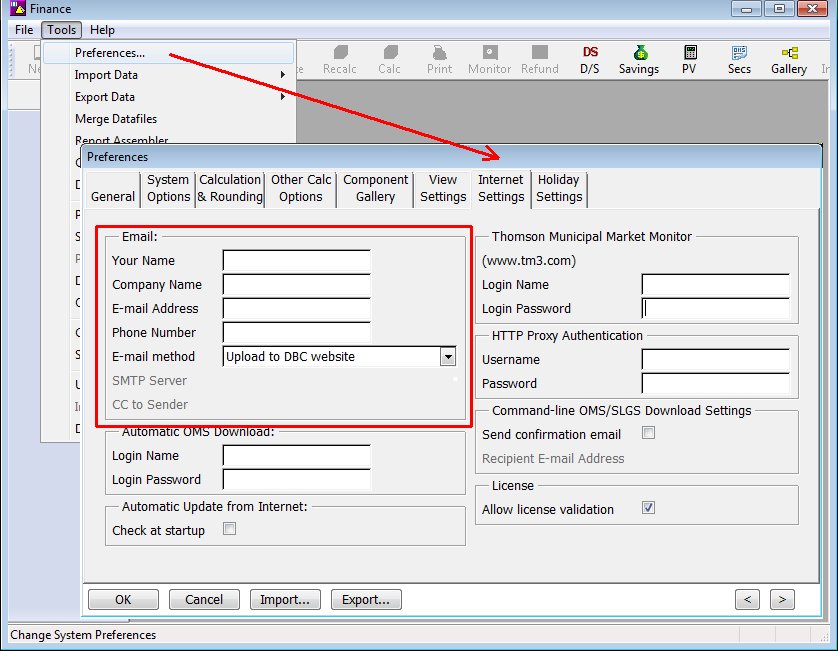
Each connected license will be listed by the user's e-mail address and network IP address. The user must have provided their contact information in the DBC program (see below) otherwise unknown will be printed. The e-mails are provided so the users may be contacted.
To enter the e-mail address in the DBC program, go to:
Tools | Preferences | Internet Settings
Or
Tools | System Preferences | Internet Settings
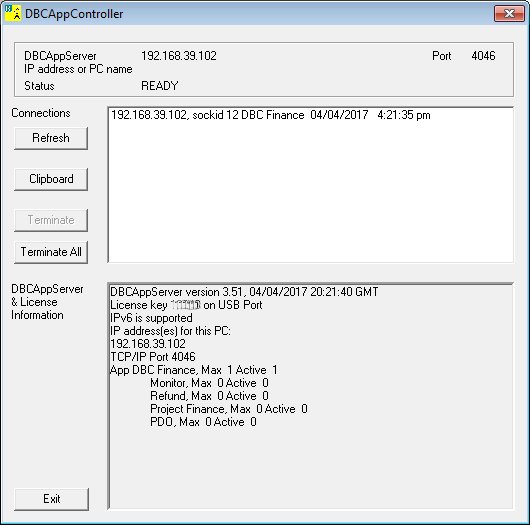
The DBCAppController program (dbcappctrl.exe), the management interface to DBCAppServer displays the following information.
- Select a connection and hit Terminate to close the session.
- Hit Refresh to update the display.
- Hit Clipboard to copy the connections to the Windows clipboard (e-mail addresses or unknown will be included).
Usage log
To generate a usage log:
- Start svcsetup.exe which should be installed in the same directory as the DBCAppServer program.
- Stop DBCAppServer. Any DBC programs already running will go into a state where the user can only Save and/or Exit.
- Check Generate log file.
- Start DBCAppServer.
